

Table of contents
Important information for all Joomla website owners! In early June 2026, security researchers discovered a critical vulnerability in the popular JCE (Joomla Content Editor).
The vulnerability has been assigned CVE-2026-48907 with a CVSS v4.0 score of 10.0, which corresponds to a maximum threat level. Attackers have already begun scanning the internet for vulnerable sites.
We strongly recommend checking your sites immediately. Delaying the update will lead to full site compromise.
Attack Mechanism: Why Is This Dangerous?
The vulnerability is an access control bypass (CWE-284) within the JCE component. Unlike many other security flaws, this attack does not require authentication. This means the attacker doesn't need to know your administrator password.
How the hack works:
-
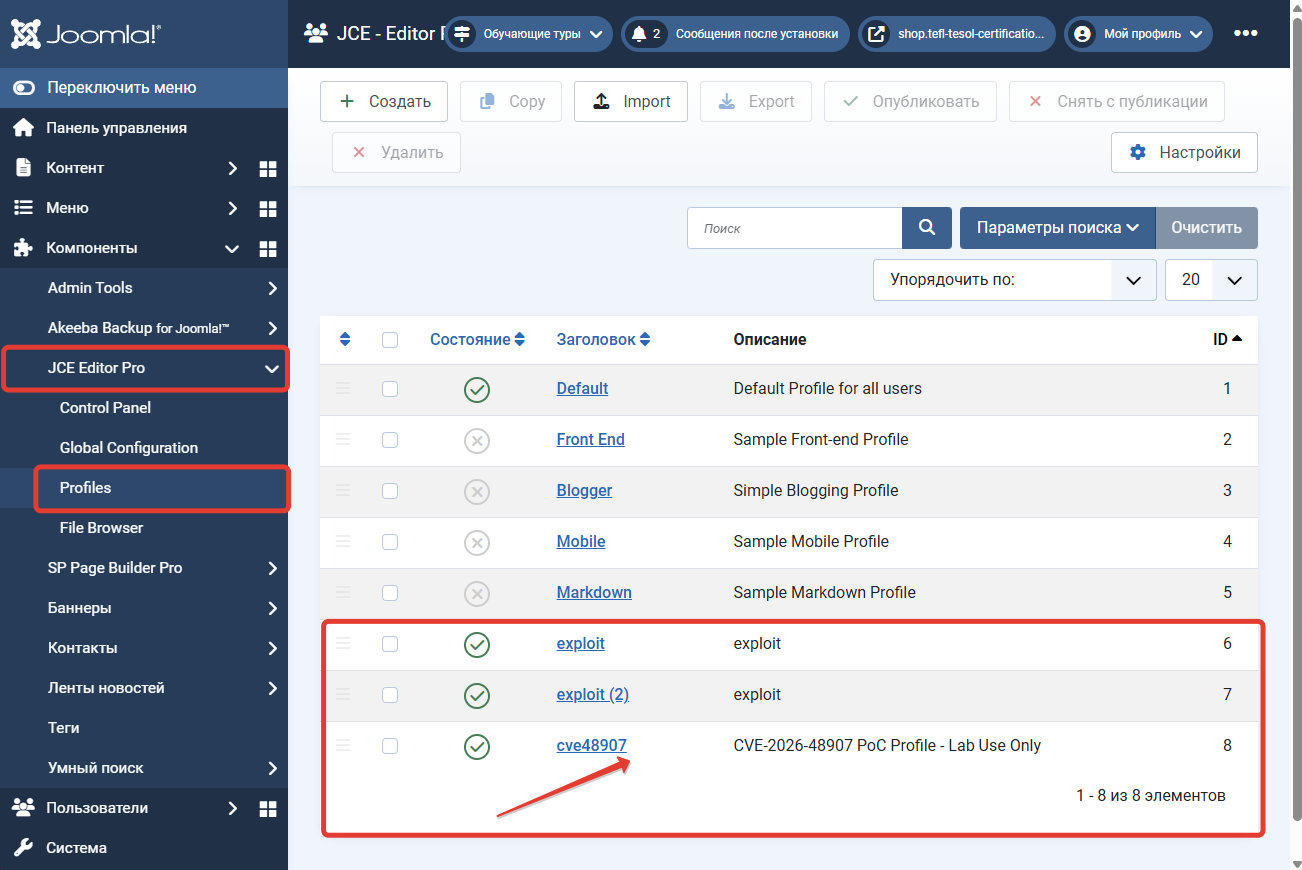
Profile Creation: An unauthenticated user sends a specially crafted HTTP request to the JCE component, which allows them to create a new editor profile.
-
Configuration: Within the created profile, the attacker assigns file upload permissions to the "Public" user group.
-
Shell Upload: Using this profile, the hacker accesses the standard JCE file manager (typically used for uploading images into articles) and uploads a file.
-
Trick: The file is often disguised as
image.gif(a valid GIF containing embedded PHP code) or as a double-extension file (image.php.gif).
-
-
Code Execution: After the file is uploaded to the
/imagesfolder, the attacker renames it (or executes it directly if the server is misconfigured), turning it intoshell.php. -
Outcome: The hacker gains access to your server's file system, can modify the database, install malware (viruses, cryptominers), or redirect traffic to fraudulent websites.
Who Is at Risk?
All sites running JCE component versions below 2.9.99.5 are at risk, including versions 1.0.0 through 2.9.99.4.
If you don't know which version of JCE you have — you are at risk.
How to Fix It: Step-by-Step Instructions
JCE developers have quickly released patched versions. To remediate the vulnerability, you must follow a strict procedure. Currently, the safe versions are 2.9.99.5 (critical patch) and 2.9.99.6 (additional security hardening).
Step 1. Update JCE Immediately
-
Go to your Joomla administrator panel and navigate to Extensions → Manage → Update.
-
Click "Purge Cache" and then "Find Updates".
-
Locate JCE (Joomla Content Editor) in the list.
-
Update to version 2.9.99.5 or higher (2.9.99.6 is recommended).
If the update does not appear:
Download the latest version manually from the official developer website and install it via Extensions → Manage → Install.
Step 2. Check Editor Profiles (Critical!)
Even after updating, this will not remove a profile that the hacker may have created before the update.
-
Go to Components → JCE Editor → Profiles.
-
Examine the list carefully. If you see a profile (especially with an unusual name, random characters, or simply a new profile) where, under the Permissions tab, the Public group has file upload permissions enabled — your site has already been hacked.
-
Action: Delete such a profile immediately.
-
Step 3. Audit the /images Folder
Since you were in the risk zone, you need to check whether the attacker managed to upload a backdoor before you updated.
-
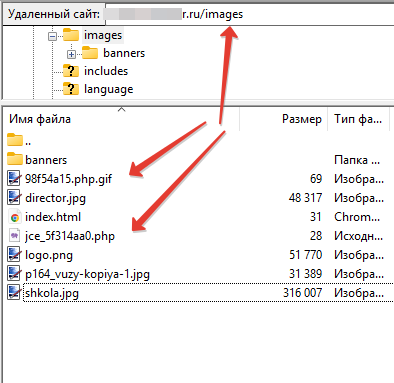
Using your hosting provider's File Manager or FTP, open the
imagesfolder (and all its subfolders, such asimages/storiesorimages/sampledata). -
Look for suspicious files:
-
Files with a creation date matching the period before your update.
-
Files with extensions like
.php,.phtml,.shtmlthat should not normally be there (theimagesfolder typically contains only.jpg,.png,.gif,.svg). -
Files with names such as
jce_5f314aa0.php,jce_5f314aa0.php.gif, or random character sequences (x19d02.php).
-
What If Your Site Is Already Hacked?
If in Step 2 you found a suspicious profile, or in Step 3 you found extraneous PHP files, consider your site compromised.
Post-hack recovery procedure:
-
Do NOT panic and do NOT delete everything randomly, as this may break your site completely.
-
Find a clean backup (created before June 1-2, 2026).
-
Restore your site from the backup.
-
IMMEDIATELY update JCE to version 2.9.99.6 on the restored site (to prevent the vulnerability from reoccurring).
-
Change all passwords: database access, FTP/SSH, and hosting control panel.
-
Check other sites on the same hosting account. Typically, if one site on shared hosting is infected (unless isolation is properly configured), neighboring sites may also be compromised. Delete any suspicious files found in the roots of adjacent sites.
[warning name="Warning!"]
Simply deleting suspicious files and updating JCE is often not enough. Hackers leave backdoors in extension cores or templates. Without experience, you might miss hidden scripts. [warning]
How to Protect Yourself in the Future
-
Enable automatic updates for the JCE component (this option is available in Joomla's update settings).
-
Use Admin Tools Pro: Generate a strict
.htaccessfile and enable PHP script execution blocking within the/imagesfolder. This will prevent uploaded "Trojans" from running even if another vulnerability exists. -
Stay informed with security digests. We publish threat news as soon as it emerges.