

Table of contents
- Understanding the Threat: What Was Fixed?
- Live Preview and Coming Soon Access Bypass
- Permission Checks for AJAX Media Actions
- Mega Menu and Layout Security
- Enhanced Image Upload Validation
- Page Title and HTML Attribute Validation
- Social Share Buttons and Video Embeds
- Style Identity Validation for Draft Cache
- Permission Check When Saving Articles from the Frontend
- Image URL Escaping in Legacy Layouts
- Other Changes in Version 2.2.10
- Who Is at Risk?
- How to Fix It: Step-by-Step Instructions
- We can do everything for you
On August 27, 2026, JoomShaper released Helix Ultimate 2.2.10. This update includes twelve security fixes addressing issues related to access control, media handling, Mega Menu, article saving, and output escaping.
The developer rated the threat level as High / Medium and stated that all versions below 2.2.10 are affected. The most exploitable issue required no authentication: a special URL parameter allowed bypassing the Coming Soon page and viewing the site with draft template settings applied.
At the time of writing, no individual CVE identifiers have been published for the fixes in version 2.2.10. There is also no confirmed evidence of mass exploitation of these issues, but the update is recommended without unnecessary delay.
Understanding the Threat: What Was Fixed?
Version 2.2.10 includes twelve security fixes. Some issues could be exploited by anonymous visitors, while others required a user account with specific permissions on the site.
Live Preview and Coming Soon Access Bypass
This is the most serious issue in the release and the only one that required no account to exploit. In versions below 2.2.10, adding the ?helixMode=edit parameter to a URL could allow an anonymous visitor to:
- bypass the Coming Soon page and access an unpublished site;
- view pages rendered using unsaved draft template settings.
In version 2.2.10, this mode is only available to authenticated users with template editing permissions.
Permission Checks for AJAX Media Actions
Permission checks for AJAX requests related to media files have been strengthened. Viewing directories, uploading and deleting files, and creating folders now require template editing rights and the appropriate com_media component permissions.
Previously, a more general check was used that did not provide the necessary granularity for each action.
Mega Menu and Layout Security
The Mega Menu settings endpoint now checks permissions for the specific menu to which the edited item belongs, rather than just verifying general menu management rights. This prevents users with access to only part of the menu from modifying other items' settings.
Additionally, layout settings output escaping has been strengthened, reducing the risk of unwanted HTML or JavaScript injection.
Enhanced Image Upload Validation
Previously, uploaded image validity was largely determined by file extension. Version 2.2.10 adds checks for actual content and MIME type using getimagesize, finfo, and image decoding.
Path handling has also been strengthened through canonicalization with realpath and null byte detection. This makes it harder to traverse outside allowed directories or supply unexpected file paths.
Page Title and HTML Attribute Validation
The page title feature used menu item parameters when generating HTML markup. In version 2.2.10:
- the heading HTML tag is selected only from an allowlist of values;
- color values are validated against HEX format;
- background image URLs are quoted and escaped before being added to the
styleattribute.
Social Share Buttons and Video Embeds
Facebook, Twitter, and LinkedIn buttons built links by inserting article titles and URLs directly into JavaScript strings inside onclick attributes. Video and audio layouts similarly inserted YouTube or Vimeo IDs into iframe addresses.
In the fixed version, links are built more securely, output values are escaped, and embed media identifiers are restricted to a safe character set. Before the update, a user with article creation or editing permissions could potentially use these fields to inject unwanted code into pages.
Style Identity Validation for Draft Cache
Previously, style information including ID, template name, and other parameters was taken from the POST request when writing to the draft cache. When reading it back, the template name was used in file path construction.
Now the style is loaded from the database by verified ID, and the template name is restricted to a safe set of letters, digits, hyphens, and underscores.
Permission Check When Saving Articles from the Frontend
Helix Ultimate processes its own article parameters during frontend saves. Previously, the handler checked the request context but did not verify that the user could edit that specific article.
Version 2.2.10 adds a core.edit permission check for the article. If core.edit.own is used, it additionally checks whether the user is the article's author.
Image URL Escaping in Legacy Layouts
In legacy full-image and intro-image layouts, the Helix Ultimate custom field value was output directly into the src attribute. The image URL now passes through htmlspecialchars.
Layouts used by Joomla 5 and 6 already performed the appropriate escaping. This fix primarily affects older layouts used by Joomla 4 and Joomla 3.
Other Changes in Version 2.2.10
In addition to security fixes, this release includes regular technical fixes for Joomla 4, 5, and 6:
- the disabled Helix Ultimate system plugin no longer reactivates automatically during template updates;
- fixed parameter migration between multiple template styles;
- fixed lazy image loading on the site;
- updated processing of JoomShaper update server records;
- the installer removes old SCSSPHP 1.x directories that could remain alongside the newer library.
Who Is at Risk?
Sites running Helix Ultimate versions below 2.2.10 are at risk. According to JoomShaper, all previous framework versions are affected.
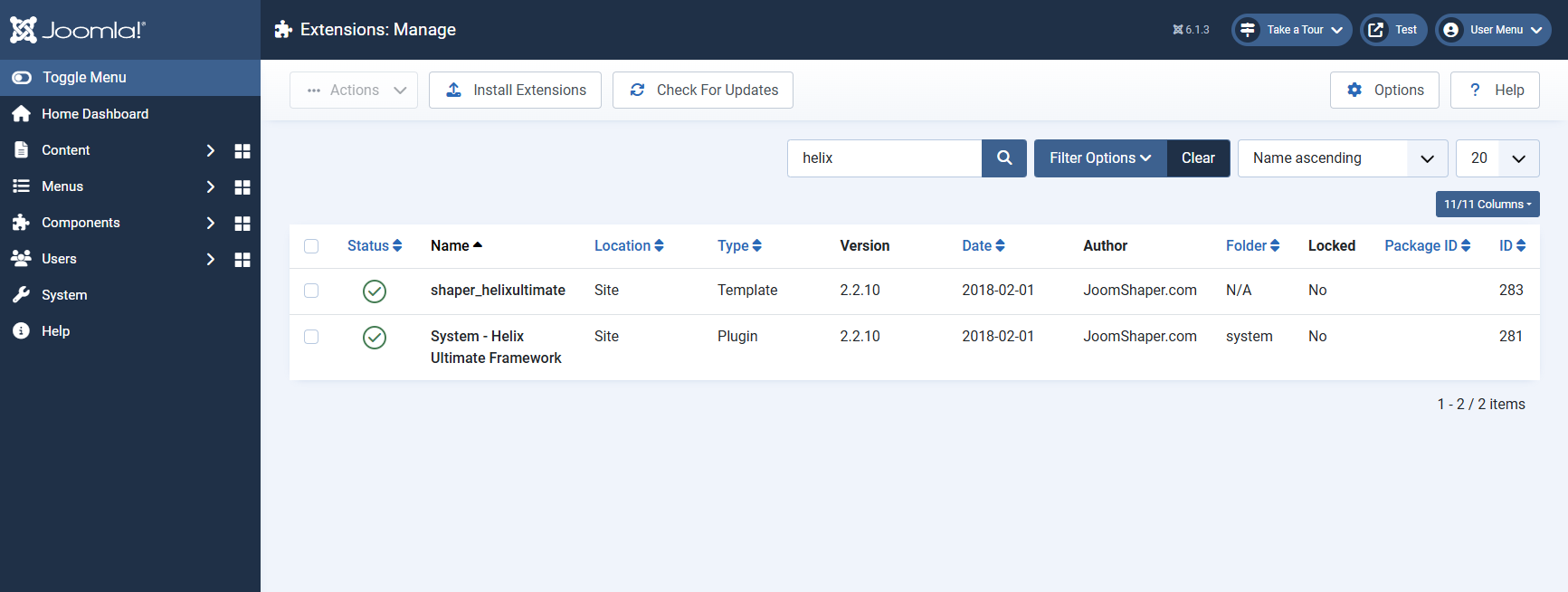
You can check the installed version in the Joomla administrator panel via System → Manage → Extensions. Find the Helix Ultimate package or system plugin and check the version number.
How to Fix It: Step-by-Step Instructions
To address the issues listed above, update Helix Ultimate and review the key areas of your site that may have been affected by insufficient permission checks and escaping.
Step 1: Update Helix Ultimate on Joomla 4, 5, and 6
- Create a backup of your site files and database.
- Go to System → Update → Extensions.
- Click "Check for Updates".
- Find Helix Ultimate and install version 2.2.10 or higher.
- After updating, clear Joomla cache, template cache, CDN, and browser cache.
- Check the homepage, menus, Mega Menu, mobile version, and settings of your template styles.
Separate Update for Joomla 3
Helix Ultimate 2.2.10 does not install on Joomla 3. For the legacy CMS version, JoomShaper has released a separate patch package that must be downloaded from the official JoomShaper GitHub repository and installed manually via Extensions → Extension Manager → Install.
The standard Joomla 3 update manager will not offer this package automatically. Always create a full backup before installation and test the update on a staging copy first, especially if you have made custom changes to Helix Ultimate files.
Step 2: Check for Suspicious Changes
Updating closes vulnerable handlers but does not undo changes that may have been made before installation. At the time of writing, there is no published evidence of mass exploitation of the version 2.2.10 issues, so reviews should be conducted without assuming that every unupdated site has been compromised.
- Preserve logs: Before removing files or users, save Joomla logs, web server logs, hosting panel logs, and security tool logs.
- Check users: Look for unknown accounts and unexpected group access changes. Before blocking or deleting, save IDs, emails, groups, and registration dates.
- Check Mega Menu: Look for unknown changes, HTML attributes, links, and JavaScript code.
- Check template styles: Review active styles, custom CSS, JavaScript, code before closing tags, and draft settings.
- Check media files: Look for unknown or recently modified files in the
/imagesand/mediadirectories. Pay attention to PHP files, double extensions, and files whose content does not match their extension. - Check articles: Review recently modified articles and their Helix parameters, especially articles by users with author or editor rights.
Step 3: Additional Security Measures
After installing the update, we recommend the following actions:
- Update Joomla and all other extensions to the latest compatible versions.
- Remove or disable unused extensions: less executable code means a smaller potential attack surface.
- Review user permissions: give authors, editors, and managers only the rights they need for their work.
- Enable multi-factor authentication for all users with administrator panel access.
- Configure a Web Application Firewall: for example, Admin Tools Professional or your hosting provider's WAF. A WAF is an additional layer and does not replace updating Helix Ultimate.
- Regularly create backups and keep at least one recent copy off the server.
- Monitor file integrity: track unexpected changes to PHP and JavaScript files in templates and extensions.
We can do everything for you
If everything listed above seems too complicated, if you simply do not want to spend your time on it or if you would like to save money on expensive extensions, we are ready to help:
- update your website to the latest Joomla version together with all extensions used on it;
- audit the installed extensions and then remove those that are not being used;
- configure website backups, including backups to remote storage;
- install licensed versions of popular extensions on your website;
- protect your website from hacking by implementing additional security measures;
- take your website under our wing by regularly updating the CMS and all extensions, including commercial ones.
Submit a request List of services
Terms used:
AJAX, Frontend, Package, CMS, CSS, HTML, JavaScript, PHP, XSS, Authentication, Backup, Menu, Helix Ultimate