
Table of contents
- Why do you need redirects in Joomla?
- Terms and definitions
- Required extensions
- How does the Redirects component work?
- Component settings
- Redirect list page
- Creating a new redirect
- Bulk import
- Batch processing
- The System - Redirect plugin and its order
- Nuances: static files, nginx, and Apache
- Differences from third-party solutions
- Menu items and display
- Conclusion
A complete guide to the native Redirects component in Joomla: how it works, configuration, server environment nuances, plugin order, and SEO integration.
Why do you need redirects in Joomla?
The Redirects component (com_redirects) is a standard Joomla tool designed to manage redirects. Its main task is to seamlessly redirect users and search engines from old, broken URLs to new, relevant ones. This is critically important for:
-
Preserving SEO value when changing your site's structure or article SEF URLs.
-
Improving user experience: instead of seeing a 404 error page, users land on a relevant page.
-
Preventing traffic loss from external links pointing to outdated addresses.
Terms and definitions
Let's look at the main entities of the Redirects component in Joomla:
-
System - Redirect plugin
A system plugin that is the heart of the redirect mechanism. It intercepts requests to non-existent pages, checks if a rule exists in the component, and performs the redirect if a rule is found. -
Redirects component (com_redirects)
The component in the administrator panel where you create, edit, and manage redirect rules. It stores all created rules in the database. -
Source URL (Expired URL)
The old, broken address you want to redirect from. This must be a broken URL that returns a 404 error. -
Destination URL (New URL)
The address the user will be redirected to. This can be either a full (absolute) or relative path. -
Status Code
The HTTP code returned during the redirect. By default,301 Moved Permanently(permanent redirect) is used. In advanced mode, you can choose other codes as well.
Required extensions
For redirects to work correctly in Joomla, the following extensions must be active:
-
Redirects component (com_redirects) — the component for managing rules.
-
System - Redirect plugin — the system plugin that directly processes requests and performs redirects. This plugin must be enabled.
How does the Redirects component work?
It's important to understand the fundamental principle of how the standard redirect component works in Joomla: it only triggers when the requested page returns a 404 (Not Found) error. The plugin does not intercept requests to existing pages, even if a rule exists for them.
Here's how it works:
-
A user or search engine requests a URL, for example,
site.com/old-page. -
Joomla tries to find content at this address. If no content is found, the core generates a 404 error.
-
At this point, the System - Redirect plugin activates. It checks the
#__redirect_linkstable to see if a rule exists for the requested URL (old-page). -
If a rule is found and active, the plugin takes the
Destination URLand HTTP code from it, then redirects the user to the new address. -
If no rule is found, the user sees the standard 404 error page.
This mechanism explains a key limitation: you cannot use com_redirects to redirect from one working page to another, for example, to combat duplicate content. For that purpose, you should use rules in .htaccess or third-party extensions.
Component settings
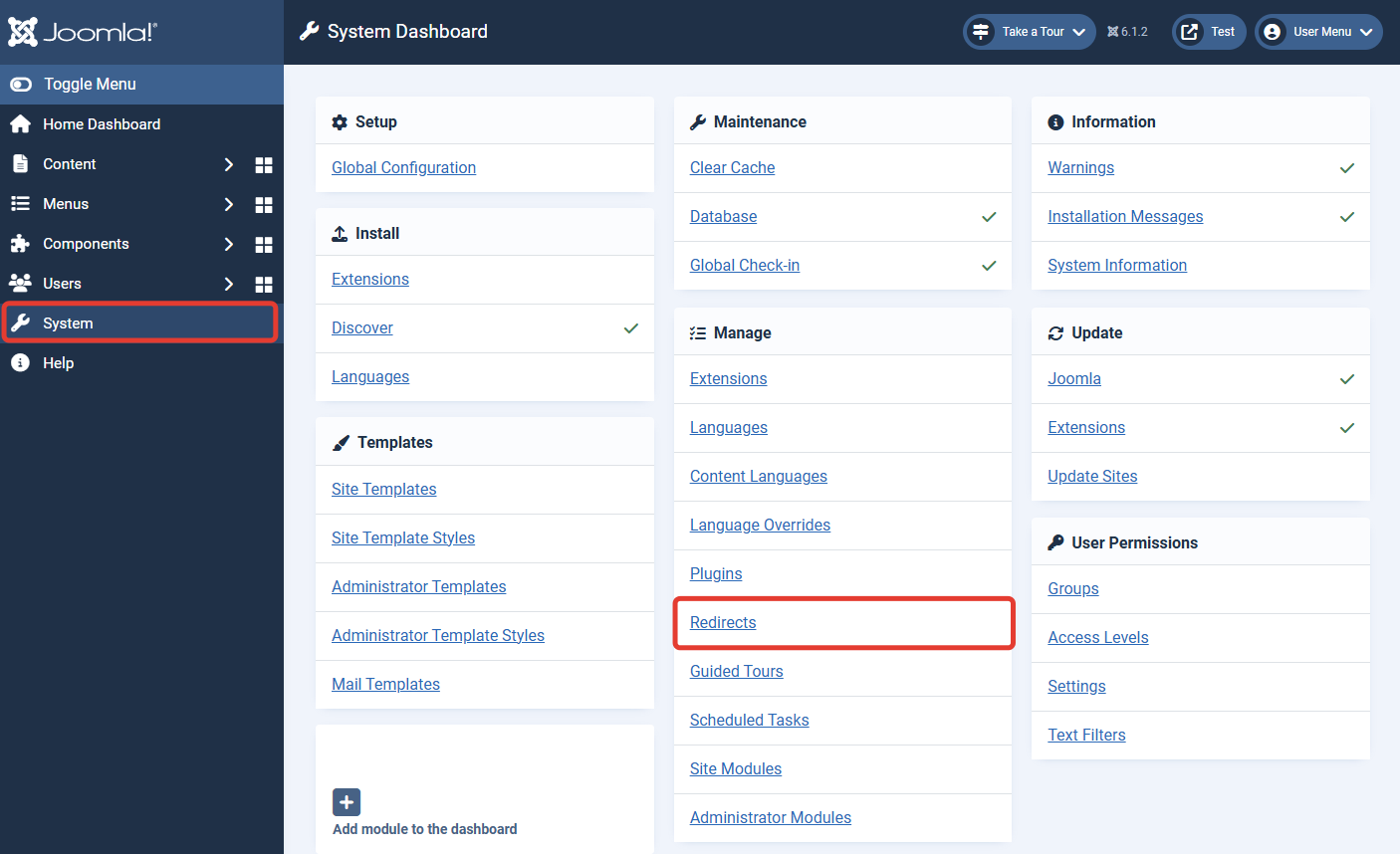
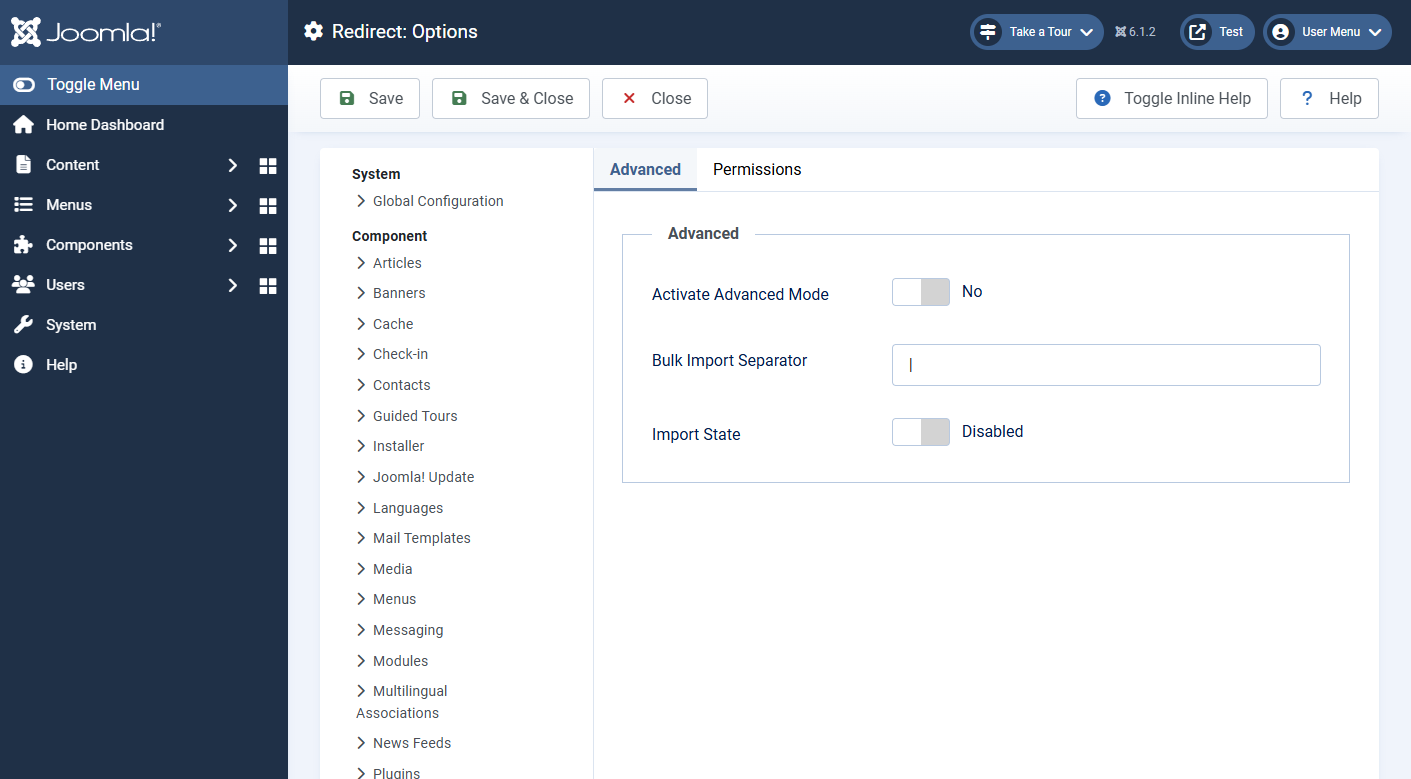
Path to the Redirects component settings in Joomla's administrator panel:System → Redirects → Options.
Main settings:
-
Activate Advanced Mode — enables the ability to select an HTTP code for each redirect.
-
Bulk Import Separator— the character (default is
|) used to separate the old and new URLs when bulk adding rules.
Redirect list page
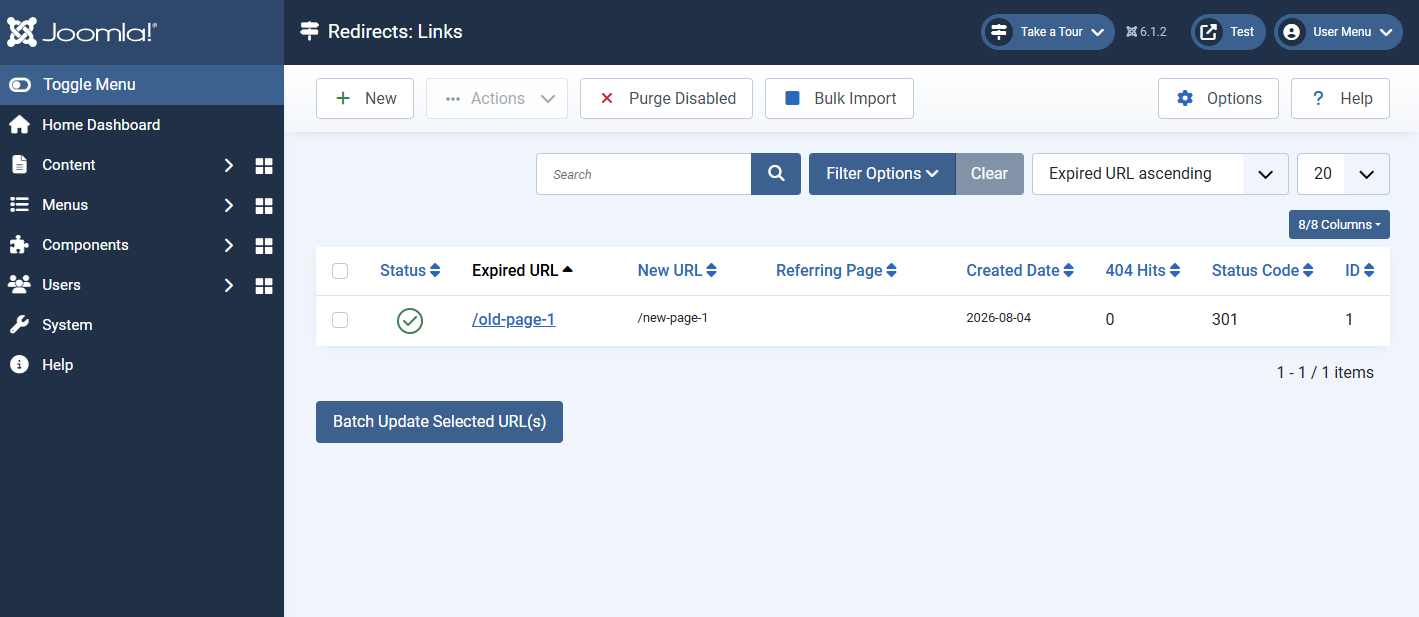
Path: System → Redirects.
This displays a list of all created rules. Columns include:
-
Status — whether the redirect is published or not.
-
Expired URL — the old, broken address.
-
New URL — the address the redirect points to.
-
Referring Page — indicates how the rule was created, either manually or automatically.
-
Created Date — the date when the redirect rule was created.
-
404 Hits — the number of times the rule has been used.
-
Status Code — the HTTP code returned during the redirect.
-
ID — the unique technical identifier of the rule in the database.
Creating a new redirect
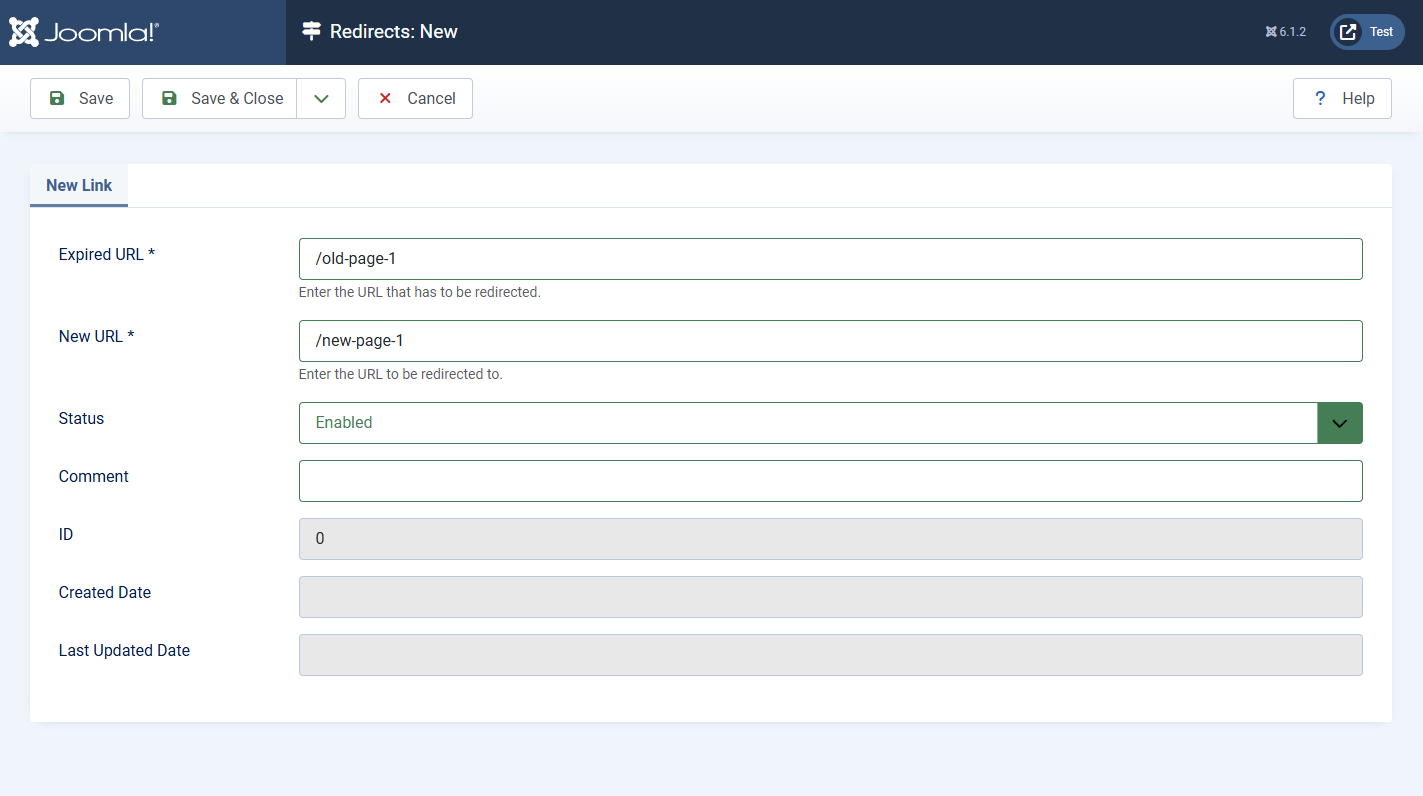
To create a new rule, click the "New" button in the list page toolbar. In the edit form, you need to fill in:
-
Expired URL: enter the old, broken address. The field should contain the full URL path, but only its part is displayed in the list. Note: the URL must be broken. If the page exists, the rule won't work.
-
New URL: specify the target address.
-
Status: set to "Enabled".
-
Comment (optional): for administrative comments.
/new-page) rather than absolute URLs with the domain (https://site.com/new-page). This allows redirects to continue working when the site domain changes or when using different mirrors (with and without www).Bulk import
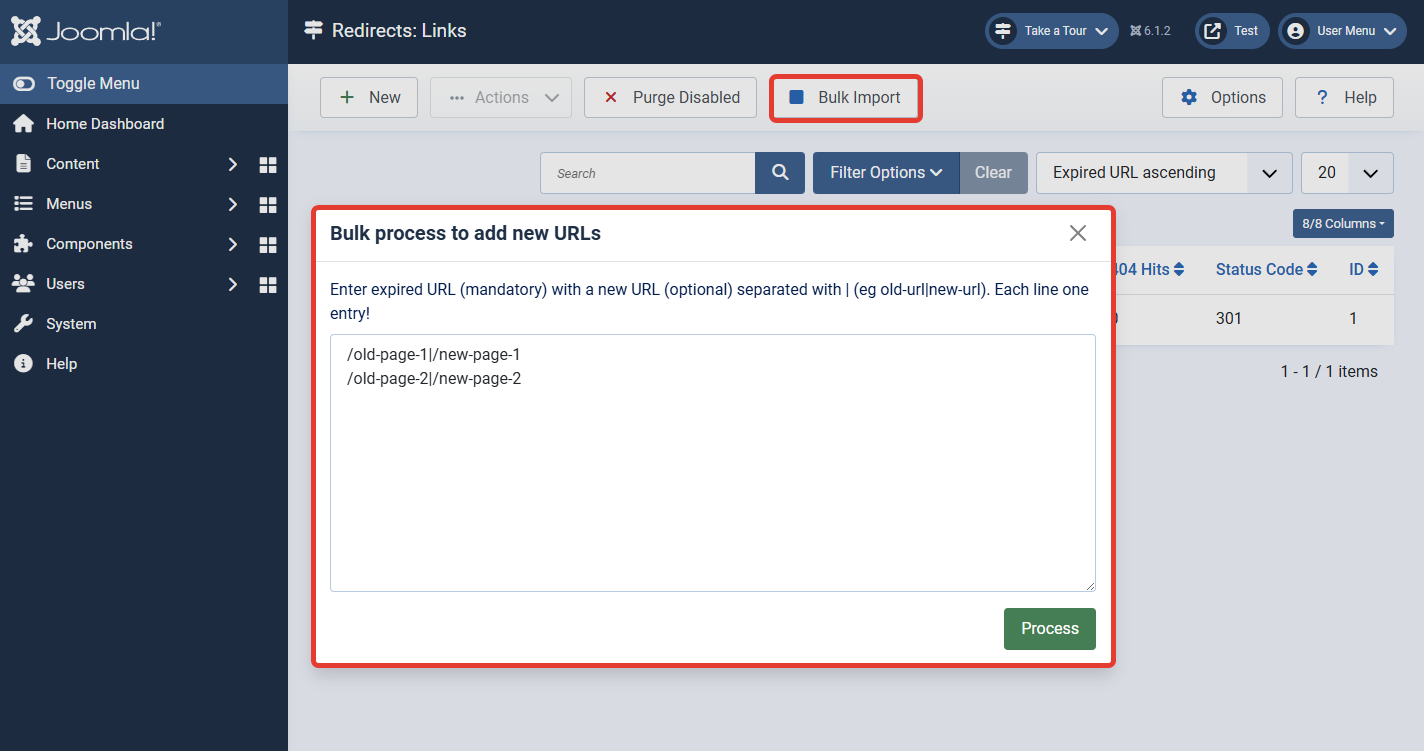
The "Bulk Import" function in the toolbar allows you to add many redirects at once. The text should be formatted as one rule per line, with the old and new URLs separated by the character specified in the settings (default is |). For example:/old-page-1|/new-page-1/old-page-2|/new-page-2
Batch processing
In addition to bulk import, the Redirects component has a "Batch" processing function. It is located at the bottom of the redirect list page, directly below the table.
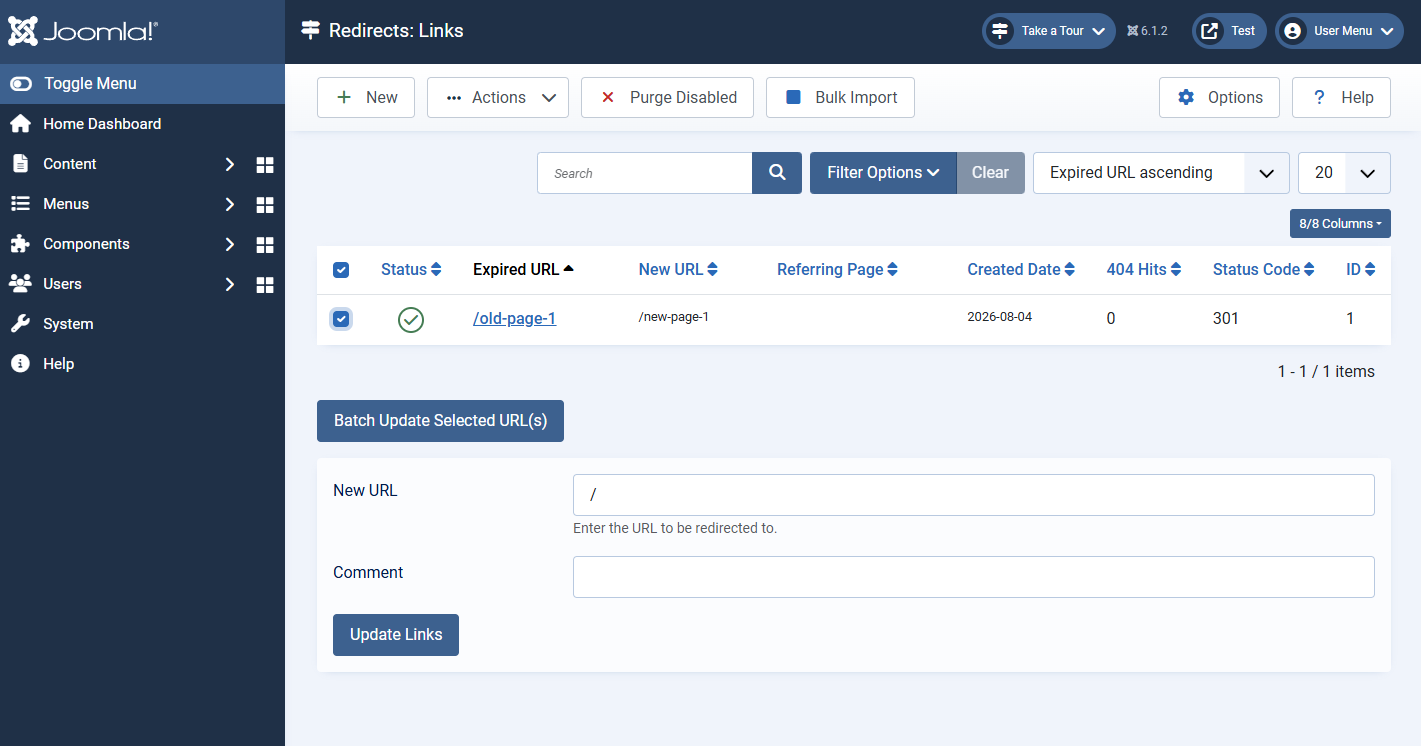
This function allows you to change the "Destination URL" for multiple selected redirects at once. This is useful if you need to redirect a group of old pages to the same new address.
To use batch processing:
-
Select the redirects you want to modify by checking the boxes in the left column of the list.
-
In the "Batch" section, fill in the "Destination URL" field — specify the target address that all selected rules will be redirected to.
-
If necessary, fill in the "Note" field — it will be applied to all selected redirects.
-
Click the "Update" button.
The System - Redirect plugin and its order
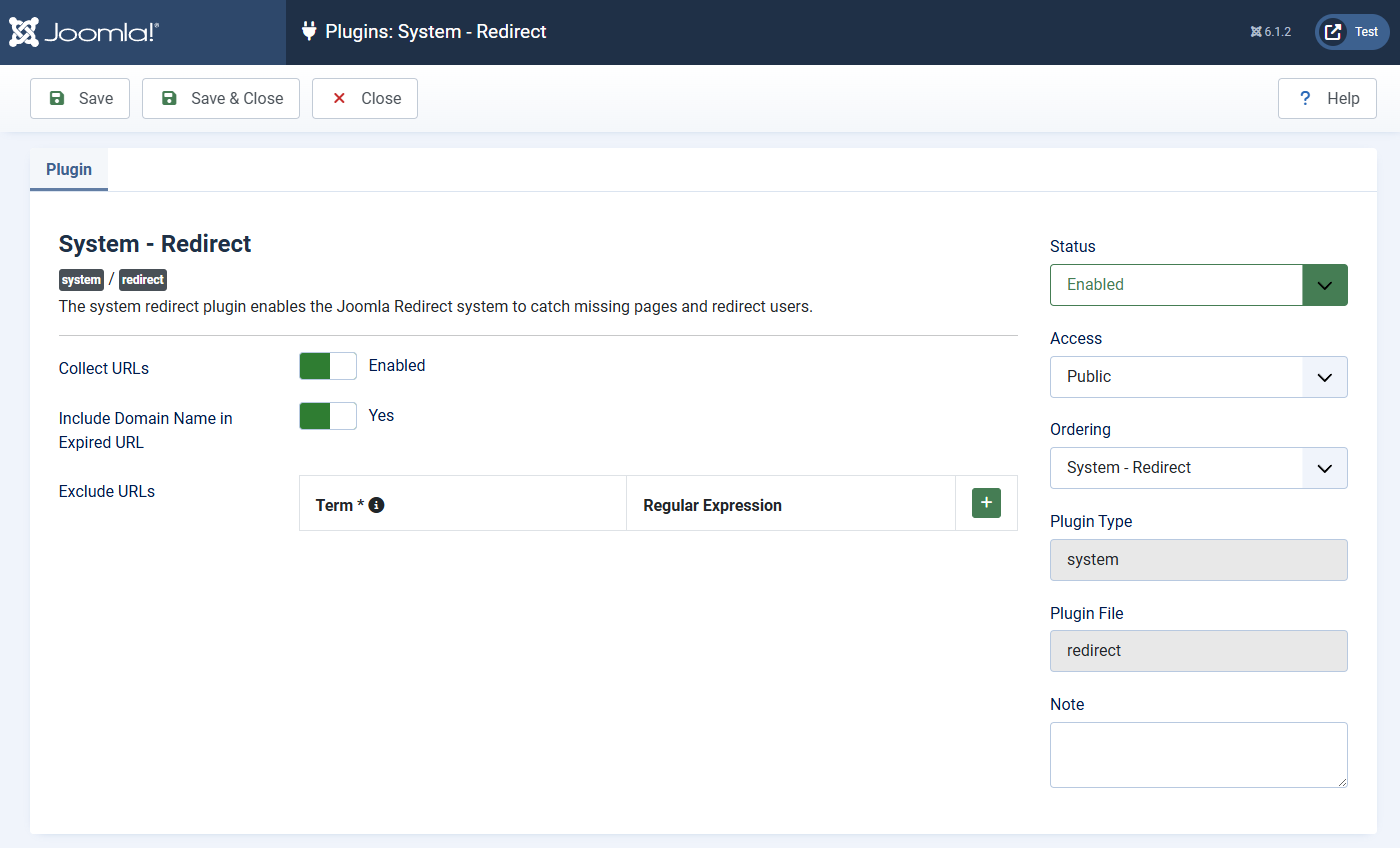
The System - Redirect plugin is a system plugin, meaning it loads on every request to the site. Its loading order relative to other system plugins matters.
In Joomla, plugins load in a specific order, which can affect their execution. For example, a bug was fixed where the logout plugin (System - Logout) could execute before the redirect plugin, which in some cases led to 403 errors instead of correct redirects during logout. As a result, developers changed the default loading order so that the redirect plugin loads earlier. It is recommended to ensure that your System - Redirect plugin has a higher ordering than other system plugins that might intercept requests.
System - Redirect plugin has several settings:
-
Collect URLs
This option enables or disables the collection of broken links (404 errors) in a special table. When enabled, each time a visitor lands on a 404 error page, Joomla records that URL in the#__redirect_linkstable marked as a "collected link". Administrators can view these collected links in the Redirects component (the "Expired URLs" or similar tab) and manually create redirect rules for them. If you disable this option, new link collection stops, but already collected ones remain in the database. -
Include Domain Name in Expired URL
This option determines how the requested URL is stored in the table. If set to "Yes", theSource URLcolumn will store the full URL with the domain name (e.g.,www.site.com/old-page). If set to "No", only the path from the site root will be stored (e.g.,/old-page). This parameter affects how you create redirect rules later. It is recommended to leave it as "No" so rules are universal and don't depend on the site's mirror (www or no www). -
Exclude URLs
This option allows you to specify a list of URL patterns that should not be processed by the plugin and should not be collected in the error table. They are specified one per line. This is useful to avoid cluttering the redirects table with technical pages, scripts, or styles that are not content-related. For example, you can exclude/administrator,/images/,/*.css,/*.js. Note that this works in conjunction with the "Collect URLs" option: if link collection is turned off, there's no need to exclude anything since nothing is being collected.
Nuances: static files, nginx, and Apache
As mentioned earlier, the redirect plugin only triggers after Joomla generates a 404 error. This means the request must be passed to Joomla (Apache) for processing.
In modern server configurations, a common setup is: nginx handles static files (images, CSS, JS) as a high-performance proxy server, while passing dynamic PHP requests to Apache.
In this case, redirects for static files from Joomla will not work because:
-
A request to an image, e.g.,
site.com/images/old-photo.jpg, is processed by nginx. -
Nginx sees the file exists and serves it immediately.
-
The request never reaches Apache and Joomla, so no 404 error is generated, and the redirect plugin is never triggered.
rewrite directives in nginx configuration or rules in the .htaccess file (if it's processed by Apache for these files).Differences from third-party solutions
While the standard com_redirects offers basic but reliable functionality, there are third-party extensions that extend its capabilities. For example, the Admin Tools component can create redirects with per-redirect GET parameter preservation settings. Another example is JRedirects, which can automatically create redirects when an article alias or menu structure changes.
Menu items and display
The standard Redirects component does not provide menu item types for frontend display, unlike the Tags or Smart Search components. All its work happens "under the hood" at the request handling level.
Conclusion
The Redirects component (com_redirects) and its system plugin are essential tools for managing content migration and maintaining SEO health on a Joomla site. Understanding its key operating principle (only for URLs that return 404) is critical for proper configuration. Always remember the impact of your server environment (nginx/Apache) on static file handling and the importance of plugin loading order. Use this powerful tool wisely to ensure the best experience for both your visitors and search engines.